Posts

HTTP Error 404.15 - Not Found

Image
Error Message : The Request filtering module is configured to deny a request where the query string is too long.

How to submit Borang E / E Form (e-E) - Borang Nyata Oleh Majikan / Employer Tax Return Form

Image
Borang E / E Form (e-E) Due Date for Submission of Borang E / E Form is 31st March . You have 1 month grace period start from 1st March Goto LHDN Malaysia portal https://www.hasil.gov.my or https://ez.hasil.gov.my/CI/Login.aspx Click the "LOGIN" on your right hand side and select the "e-Filling" Click the "Log Masuk" button. You can change your prefer language by click the "BM" for Bahasa or "EN" for English Or https://ez.hasil.gov.my/CI/Login.aspx Fill in your registed I/C number and Click the "Hantar" button to the next page Enter your password if you security phase word is correct and Click the "Teruskan" button to the next page Click the year of "Tahun Taksiran" under Category "Bukan Individu", "e-E" Check your "Tahun Taksiran" and "Jenis Borang". And enter your "No. Cukai Penda...

Server Error - 401 - Unauthorized: Access is denied due to invalid credentials

Image
IIS Server 401 - Unauthorized: Access is denied due to invalid credentials Errors displayed when browsing the site Open IIS and select your web, double click the icon "Authentication" click & edit the "Anonymous Authentication" click & edit the "Anonymous Authentication" Select radio button "Application pool identify" as your Anonymous user identify

How to make a Windows 10 Bootable USB

Image
 You can using media creation tool from Microsoft. You need a USB stick and internet connection. 1. Open web browser and go to google.com, search "download windows 10", click on the first result from Microsoft. 2. On this page, click on "Download the tool now", the "MediaCreationTool21H2.exe" will be downloaded to your PC. It about 18MB size. 3. After downloaded. Run the "MediaCreationTool21H2.exe", Accept the license terms. 4. Select "Create installation media (USB Flash drive..." and insert your empty USB Flash Disk. 5. On this page, you need to select your language, edition and architecture. Uncheck the "Use the recommended options for this PC" if you want to have different configuration. 6. Choose "USB flash drive" to use. 7. Then select the right drive you want to use. Then hit "Next" button. 8. The download page will take a while depending on your internet, USB drive and computer speed. It take ab...

HOME ASSESSMENT TOOL

Image
Kementerian Kesihatan Malaysia Home Assessment Tool for home quarantine. HOME ASSESSMENT TOOL UNTUK PESAKIT COVID-19 DEWASA GEJALA D1 D2 D3 D4 D5 D6 D7 D8 D9 D10 CATATAN Sakit tekak atau selesema                       Batuk (*jika semakin teruk)                       *Demam (**jika berpanjangan)                       **Sukar bernafas (SOB)           ...

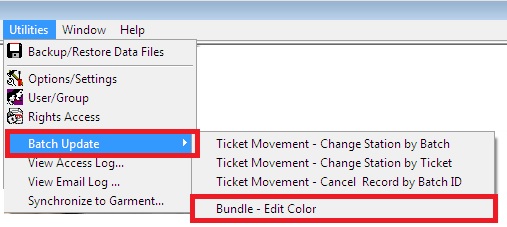
Ticketing - Batch Update - Edit Wrong Color

Image
 How to correct the wrong color code 1.  Login to Ticketing System 2.  Utilities -> Batch Update -> Batch - Edit Color 3.  Fill in the Style number, fabric type, cutting bed number, and the wrong and correct color code 4. System will prompt you how many records will be changed and the range of bundle number. Please confirm the information and click "OK" to update the color code. 5. Please recheck your data after changed. Requested by  8 STAR SPORTSWEAR LTD - Janeth Romero . 11 FEB 2022

JSON - Java's Son

Image
JSON stands for JavaScript Object Notation. It is a lightweight data-interchange format. JSON is based on a subset of the JavaScript Programming Language Standard ECMA-262 3rd Edition - December 1999. JSON is a lightweight format for store and transporting data. JSON is often used when data is sent from a server to web page JSON is easy to understand as compared to XML In JSON , values must be one of the following data types: String Number Boolean Array Object or null Key and Value are two main parts of the JSON. KEY : A Key is always a text enclosed in quotation marks. VALUE : A value can be a string, number, boolean, expression, array of object. {    "name" : "David",    "company" : "Websoft",    "online" : true,    "updated": "2021-12-31T23:28:56.782Z...